Fixed start times
Pick the hours and days that match your week — separately for Claude and Codex; each time fires independently.
Keep the fire lit.
A tiny macOS launchd scheduler that sends low-cost check-ins at the times you choose — then logs every run, token, and quota snapshot. Runs entirely on your Mac.
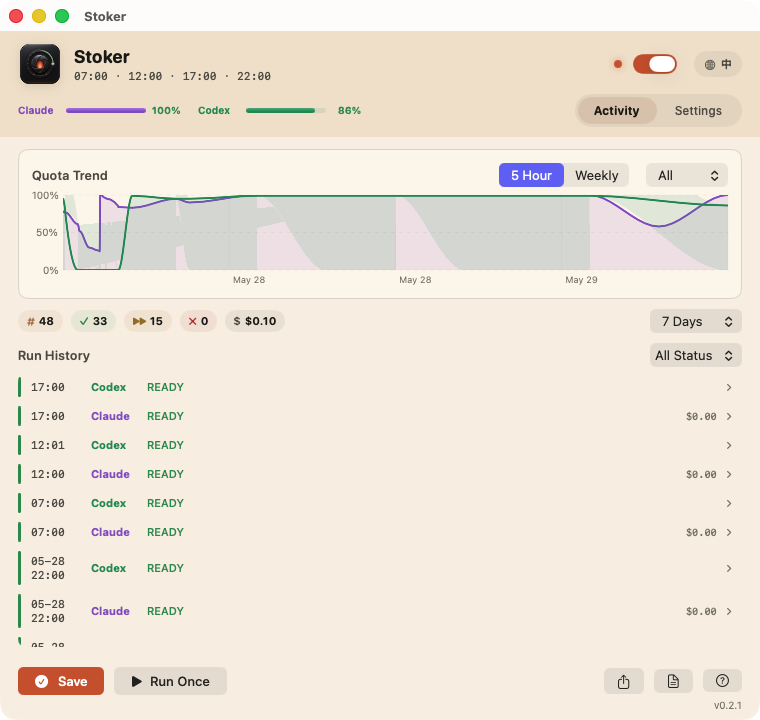
What it does, how the schedule works, and what you see in the app.
If the first prompt of a window lands late, the whole window shifts late. Stoker fires a tiny check-in at fixed times so your windows open when you actually start working.
Pick the hours and days that match your week — separately for Claude and Codex; each time fires independently.
The windows your plan has (5-hour, weekly, or both), recorded after every run.
Quota preflight skips a tool gracefully instead of wasting a call.
Every run is the same calm, four-beat loop.
Reads .env, then takes a lock — a trigger that fires at the same moment waits its turn.
Checks quota before sending. Exhausted tools are skipped and logged.
Each CLI gets a tiny check-in, kept to its own folder — no tools run, your real projects never touched.
Appends usage + quota snapshots, then releases the lock for next time.
# clone, configure, and light the pilot
$ git clone https://github.com/hakupao/stoker.git
$ cd stoker && cp .env.example .env
$ ./install.sh check
$ ./install.sh dry-run   # shows commands, sends nothing
$ ./install.sh ✓ schedule loaded · next run 12:00Triggers Claude Code and Codex through macOS launchd — each tool on its own times and days.
Each check-in stays tiny and read-only, kept to its own folder — never your real projects.
Every activation in plain text at logs/activation.log.
Structured token and cost rows in logs/usage.jsonl.
Whichever windows your plan has (5-hour, weekly, or both), in logs/status.jsonl.
Skips activation gracefully when a known quota is exhausted.
Detects the usage windows your plan has and recommends a schedule for them. You decide whether to use it.
Stoker sends real prompts, so it uses real quota. Here is exactly how much.
≈ $0.30 / month for Claude at 4 activations a day.
A native menu bar app over the same engine — bilingual, light or dark.
Not affiliated with, endorsed, or sponsored by Anthropic, OpenAI, or Apple. Stoker uses your real quota; you are responsible for complying with each provider's terms.
About $0.0025 per Claude activation (~1.6K tokens). Roughly $0.30/month at four runs a day. Codex uses your plan quota.
Yes. It sends real prompts, and that is the point. A tool whose quota is used up is skipped. How much check-ins help depends on your plan. Open Settings in the app, or run ./install.sh recommend, to see.
No. It runs in its own folder with a tiny read-only check-in, and never reads or modifies your real projects. dry-run and quota send nothing.
No. Stoker is an independent open-source project, not affiliated with Anthropic, OpenAI, or Apple. You are responsible for following their terms.
Run ./install.sh uninstall (or use the menu bar app) to unload and remove the LaunchAgents.
That’s expected on first launch: the app is open source and ad-hoc signed, not notarized. Click Done, then open System Settings › Privacy & Security and click Open Anyway (on macOS 14, right-click the app ▸ Open). If it says the app is damaged, run xattr -dr com.apple.quarantine /Applications/Stoker.app in Terminal. You only do this once.
Two ways to install — same scheduler underneath.
For most people. A GUI monitor + settings over the bundled engine.
Download .dmgAd-hoc signed, not notarized — macOS asks you to approve it once on first launch. See the first-launch steps ↓
For terminal users who want the lightest install and direct shell control.
git clone https://github.com/hakupao/stoker.git
cd stoker && cp .env.example .env
./install.shStoker is open source and only ad-hoc signed (no paid Apple notarization), so macOS blocks it the first time. It runs entirely on your Mac and the full source is on GitHub. Approve it once:
Open the DMG and drag Stoker.app onto the Applications folder. Launch it from there, not from the DMG.
macOS shows “Stoker” Not Opened — Apple could not verify… Click Done (on macOS 14: Cancel) — not Move to Trash.
Open System Settings › Privacy & Security, scroll to Security, and click Open Anyway next to “Stoker” was blocked… Confirm with Touch ID or your password, then click Open Anyway once more. The button only shows for about an hour — if it’s missing, double-click the app again.
Right-click (or Control-click) Stoker.app ▸ Open, then click Open in the dialog.
Run this in Terminal, then open the app again. It only removes the download quarantine flag from this one app.
xattr -dr com.apple.quarantine /Applications/Stoker.appOnly needed once. Later launches open normally — after updating to a newer version, macOS may ask you to approve it once more.
Keep the fire lit.